
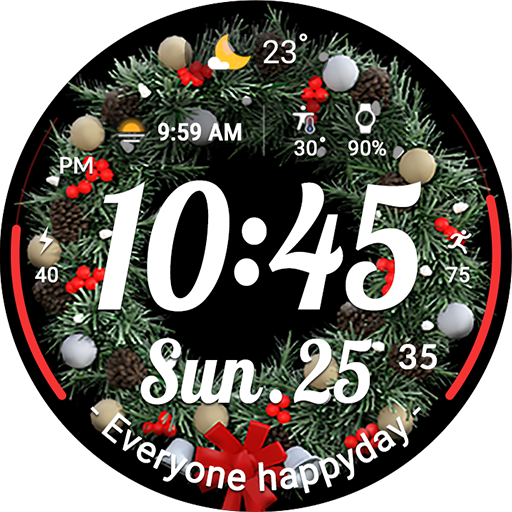
ACRO Happy Christmas Watchface
ACRO Happy Christmas Watchface App Info
-
App Name
ACRO Happy Christmas Watchface
-
Price
0.49
-
Developer
ACROWatch
-
Category
Personalization -
Updated
2025-10-24
-
Version
Varies with device
Frequently Asked Questions
How do I install the ACRO Happy Christmas Watchface on my Wear OS device?
Install the Play Store app on your smartphone, then connect your watch. Share the watchface's Play Store link via 'Share', and install on your watch through your browser's 'Install on another device' feature.
How can I customize the Christmas themes and colors on the watchface?
Press and hold your current watch face, tap 'Decorate', then select 'Add Watch Face'. Use the customization options to switch themes and adjust colors to match your holiday mood.
Is the app compatible with all Wear OS smartwatches?
The app supports most Wear OS devices, but some features may vary. Ensure your smartwatch is connected properly, and if incompatible, try installing via a web browser on your PC.
Can I use the ACRO Happy Christmas Watchface all year round?
Yes, you can keep the Christmas-themed watchface installed and switch to other designs later, but it is primarily designed to bring holiday cheer throughout the season.
How do I change the watchface to a different holiday theme or design?
Press and hold your current watch face, tap 'Decorate', then 'Add Watch Face'. Browse available designs, select the one you like, and confirm to apply.
Are there any in-app purchases or subscription fees for extra features?
Most basic features are free, but some advanced customization options or additional themes may require a one-time purchase. Check the app store for available in-app purchases.
Is there a subscription service for ongoing updates or new themes?
Currently, the app offers individual purchases for themes; there's no ongoing subscription. Updates and new themes depend on app updates available in the Play Store.
Why doesn't the smartphone app screenshot match the watchface appearance?
Screenshots may not reflect real-time animations or updates. For the best experience, install and view the watchface directly on your smartwatch.
What should I do if my watchface isn't appearing correctly or features are missing?
Ensure your device is compatible, the app is properly installed, and your watch is connected. If issues persist, try re-installing the app or updating your device software.



















