

AI Video Generator-HiCut









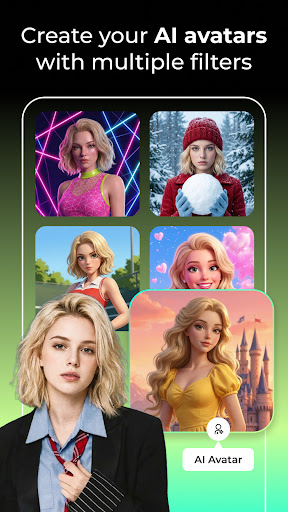
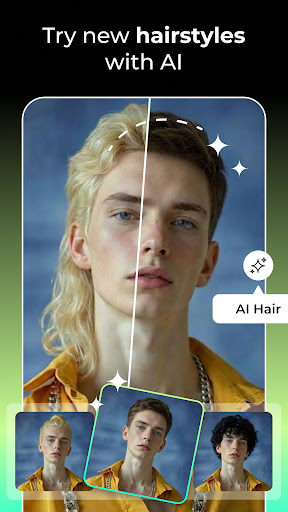



AI Video Generator-HiCut App Info
-
App Name
AI Video Generator-HiCut
-
Price
Free
-
Developer
AdoreApps Media
-
Category
Art & Design -
Updated
2026-01-19
-
Version
1.0.30
Introducing AI Video Generator - HiCut: Revolutionizing Video Creation with AI
Imagine being able to transform your ideas into professional-quality videos within minutes, all thanks to cutting-edge AI technology. That's precisely what AI Video Generator - HiCut aims to deliver—a seamless, intuitive platform designed to empower creators, marketers, and educators alike. Developed by a dedicated team of AI and multimedia enthusiasts, HiCut offers a compelling blend of automation and customization that sets it apart in the crowded landscape of video editing tools.
Core Features That Make HiCut Shine
At the heart of HiCut are several standout features that have garnered attention. First, its intelligent scene detection capability allows users to effortlessly break down raw footage into engaging segments, saving hours of manual editing. Second, HiCut's deep learning-driven style transfer lets you apply cinematic filters or thematic overlays, giving each video a distinct aesthetic flair. Third, the auto-captioning and subtitles feature ensures your content is accessible and optimized for sharing across social media platforms. Lastly, its flexible template system offers pre-designed layouts tailored for various use cases—be they promotional videos, tutorials, or social snippets—making professional-grade videos achievable even for beginners.
Jump Into the Creative Flow: User Experience and Interface
Right from the start, HiCut's interface feels like walking into a well-organized studio—clean, modern, and inviting. The design employs unobtrusive icons and an intuitive layout, making navigation feel like a breeze. For newcomers, the learning curve is gentle, with guided tutorials and tooltips that gently unfold the app's capabilities. Advanced users, on the other hand, will appreciate the granular control options and customizable settings that allow for intricate editing finesse.
The editing flow is notably smooth—drag-and-drop functions work seamlessly, with real-time previews that respond instantly to any adjustments. This responsiveness minimizes disruptions, enabling a fluid workflow akin to a well-oiled machine. Processing times are optimized thanks to backend AI acceleration, so even complex projects move swiftly from start to finish. Overall, HiCut strikes a commendable balance between usability and depth, ensuring it caters to both casual creators and more seasoned video editors.
What Sets HiCut Apart from the Crowd?
While many AI-powered video tools exist, HiCut's standout distinction lies in its dual focus on automation and artistic flexibility. Its **most innovative feature** is the AI-driven scene segmentation and automatic clip generation—think of it as having a virtual editor that diligently sorts through hours of footage and picks out the most captivating moments without your constant oversight. This capability dramatically reduces editing time and elevates content consistency.
Moreover, HiCut's style transfer feature is designed not just for aesthetic enhancement but for creative storytelling—allowing users to imbue their videos with cinematic themes or artistic effects that resonate emotionally. Unlike some competitors that offer static filters, HiCut's style overlays adapt dynamically to the footage, resulting in visually cohesive results. This combination of intelligent editing and artistic customization positions HiCut uniquely, catering to users who want professional-quality output with minimal hassle and maximum creative expression.
Final Verdict: A Solid Choice for Modern Video Creators
Considering its powerful core features, user-friendly design, and innovative AI capabilities, I would confidently recommend HiCut to a broad spectrum of users—from small business owners and social media influencers to educators and hobbyists. Its especially strong suit is enabling quick turnarounds for content creation while maintaining enough depth for personalization. If you're searching for an app that acts like your intelligent virtual assistant in the realm of video production, HiCut deserves a spot in your toolkit.
In summary, HiCut's intelligent scene segmentation and adaptive style transfer are its shining stars—these functionalities make it stand out by automating complex workflows and offering creative flexibility. Whether you're a beginner eager to craft slick videos or a seasoned creator looking for streamlined efficiency, HiCut provides a promising platform to bring your visual stories to life with ease and flair.
Pros
User-friendly interface
HiCut offers an intuitive and easy-to-navigate interface suitable for users of all skill levels.
High-quality face and scene detection
The app accurately identifies faces and backgrounds, ensuring professional-looking outputs.
Fast processing speed
Video editing and generation are completed quickly, saving valuable time for users.
Wide variety of templates and styles
Provides numerous customizable templates that enhance creative possibilities.
Affordable pricing options
Competitive subscription plans make high-quality video generation accessible for many users.
Cons
Limited free features (impact: medium)
Many advanced features are locked behind a subscription, which may be restrictive for casual users.
Occasional export quality issues (impact: medium)
Some users have reported minor quality degradation in exported videos, especially with complex scenes.
Basic customization options only (impact: low)
Advanced editing tools are limited, which could affect users seeking detailed adjustments.
Learning curve for advanced features (impact: low)
While the main interface is simple, mastering all features may require some time and tutorials.
Potential stability issues on older devices (impact: medium)
Performance may vary on lower-spec devices, leading to occasional crashes or lag.
AI Video Generator-HiCut
Version 1.0.30 Updated 2026-01-19



















