

ArtPic: Photo & Video Editor






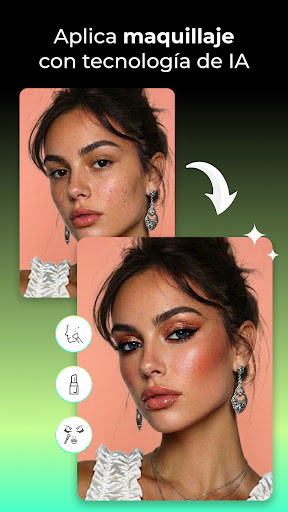



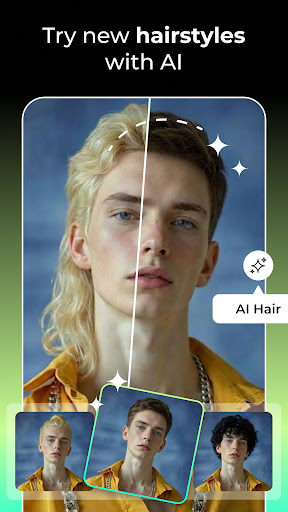



ArtPic: Photo & Video Editor App Info
-
App Name
ArtPic: Photo & Video Editor
-
Price
Free
-
Developer
AdoreApps Media
-
Category
Art & Design -
Updated
2026-01-20
-
Version
1.0.30
ArtPic: Photo & Video Editor — A Fresh Take on Creative Editing
Imagine seamlessly transforming your photos and videos into stunning visual stories with an intuitive toolkit that balances power and simplicity — that's exactly what ArtPic offers. Developed by a dedicated team committed to creative expression, this app aims to cater to both casual users and aspiring content creators looking to elevate their visual content effortlessly. With a clean interface and innovative features, ArtPic stands out as a versatile editing companion, promising not just edits but storytelling magic.
What Sets ArtPic Apart — Discover Its Core Strengths
At first glance, ArtPic might seem like just another photo and video editor, but its true charm lies in thoughtfully crafted features that make editing both fun and rewarding. Its standout highlights include an AI-powered auto-enhancement system that streamlines polishing your media to perfection, a rich palette of artistic filters and effects that breathe life into your visuals, and seamless multi-format support that allows you to work effortlessly across different media types. Plus, its quick-share options keep your creations just a tap away from social media or storage.
Intuitive Interface with User-Friendly Design
Stepping into ArtPic feels akin to entering a well-organized art studio — everything in its place, ready for your creative flow. The interface sports a sleek, modern look that's inviting without overwhelming, making navigation feel natural even for those new to editing. The home screen neatly categorizes core functions, letting you jump straight into photo or video editing modes. The icons are intuitive, with helpful tooltips that guide users through editing steps. Transitioning from one editing feature to another is smooth, thanks to optimized performance that feels like gliding over glass. Adjusting parameters or applying effects is a matter of a few taps or sliders, and the preview window offers real-time feedback so you can see your changes instantaneously. For anyone worried about learning curves, ArtPic's guided tutorials and preset configurations provide a gentle onboarding experience, turning complex edits into accessible creative activities.
Core Features Deep Dive — Creativity Made Easy
AI Auto-Enhancement: Your Personal Photo Whiz
The crown jewel of ArtPic is undoubtedly its AI-driven auto-enhancement capability. Imagine having a professional editor in your pocket who can instantly balance exposure, sharpen details, and correct color tones with a single tap. Whether you're working with a dimly lit landscape or a portrait with uneven lighting, this feature analyzes your media and applies intelligent adjustments that preserve authenticity while boosting visual appeal. This not only saves time but also empowers users who might not yet be confident in manual editing, allowing them to enjoy polished results effortlessly.
Artistic Filters and Effects — Bring Your Photos and Videos to Life
Once your media is polished, unsticking it with creative flair becomes a breeze. ArtPic offers a treasure trove of artistic filters, from vintage film looks to modern abstract vibes, enabling you to craft unique aesthetics suited to any mood or theme. Its effects are adjustable at multiple levels, giving users full control—from subtle enhancements to bold transformations. What's notable is the app's ability to layer effects seamlessly, transforming an ordinary shot into an eye-catching masterpiece or giving your videos a cinematic touch. These effects are mapped out as presets, making it easy for beginners to experiment without ending up in a maze of complex parameters.
Multi-Format Compatibility & Seamless Exporting
In today's multimedia landscape, flexibility is key. ArtPic responds with impressive multi-format support, effortlessly handling everything from high-resolution photos to 4K videos. Whether you want to crop, trim, or adjust aspect ratios, the app's export options are straightforward and versatile. Sharing your creations is just as simple: the app integrates smoothly with social media platforms or saves directly to your device in the desired quality. The rapid rendering ensures your workflow remains uninterrupted, respecting your time and creative flow.
Evaluating User Experience & Unique Selling Points
Using ArtPic feels like having a dedicated creative partner in your pocket. The combination of an aesthetically pleasing yet uncluttered interface, intuitive controls, and real-time editing feedback fosters a rewarding user experience. Unlike many competitors that overwhelm with endless options, ArtPic focuses on delivering high-impact core features with refinement. Its AI auto-enhancement stands out as a true highlight, reducing the technical barrier for newcomers while still providing room for manual fine-tuning for more advanced users. Furthermore, its artistic filters and effects are crafted to inspire experimentation without requiring steep learning curves, making it an ideal choice for hobbyists and semi-professionals alike.
Final Verdict — Should You Try ArtPic?
Overall, I consider ArtPic: Photo & Video Editor a solid and accessible tool that bridges the gap between ease-of-use and creative potential. Its standout auto-enhancement and artistic effects are especially appealing, providing users with powerful yet approachable tools to elevate their visual stories. For hobbyists or anyone looking to quickly generate polished content without diving into complicated editing suites, this app is highly recommended. However, for those seeking very advanced manual editing features or professional-grade control, it might be worth exploring alongside other options. Still, as a versatile, user-friendly, and creatively inspiring app, ArtPic deserves a good spot on your device if you want to turn everyday media into engaging visual narratives.
Pros
Intuitive User Interface
The app offers a clean and user-friendly layout that makes editing accessible for both beginners and professionals.
Powerful Editing Tools
Provides a wide range of features such as filters, cropping, and advanced video effects to enhance images and videos.
High-Quality Output
Allows exporting images and videos in high resolutions without significant quality loss.
Regular Updates
frequently releases updates to improve stability and add new features based on user feedback.
Supports Multiple Formats
Compatible with various photo and video formats, including RAW images and 4K videos, facilitating professional workflows.
Cons
Occasional App Crashes (impact: medium)
Some users experience crashes during intensive editing tasks, especially on lower-end devices.
Limited Free Features (impact: low)
Many advanced tools require a subscription or in-app purchases, which might restrict casual users.
Steep Learning Curve for Advanced Features (impact: medium)
Complex functions like masking or keyframe animations may take time to master.
Slow Rendering Times (impact: medium)
High-resolution exports can take longer than expected; users can reduce resolution temporarily to speed up.
Limited Export Options for Social Media (impact: low)
Some formats optimized for social media are not directly available; exporting to compatible formats may be needed.
ArtPic: Photo & Video Editor
Version 1.0.30 Updated 2026-01-20



















