

Asana: Where work connects




Asana: Where work connects App Info
-
App Name
Asana: Where work connects
-
Price
Free
-
Developer
Asana, Inc.
-
Category
Business -
Updated
2026-02-07
-
Version
8.81.2
Introducing Asana: Where Work Connects — A Comprehensive Review
In the vast universe of project management tools, Asana stands out as a beacon for teams seeking to streamline collaboration and boost productivity seamlessly. Developed by Asana, Inc., this platform aims to transform the way work gets done, making complex projects manageable and teamwork more cohesive.
Core Features That Make Asana Shine
At its heart, Asana offers a suite of features designed to cater to diverse teams—from small startups to large enterprises. Its key functionalities include task and project management that promotes clarity and accountability, real-time collaboration tools that keep everyone on the same page, and automation capabilities that reduce repetitive work. Additionally, its integration ecosystem connects with many other productivity apps, creating a unified workspace environment.
A User-Friendly Interface with Intuitive Design
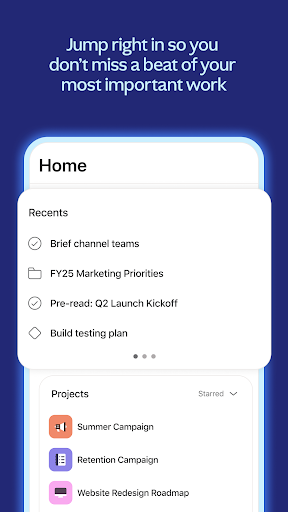
Stepping into Asana is like entering a well-organized digital toolbox; everything is where you expect it to be. The interface sports a clean, modern aesthetic, with a calm color palette that minimizes distractions. Navigation is straightforward, even for first-time users, thanks to a logical layout that guides users effortlessly through task creation, project overview, and team communication.
Operation-wise, Asana offers smooth responsiveness—clicks and drags feel natural, and transitions are seamless. Its learning curve is gentle compared to some other complex enterprise tools, which makes onboarding relatively quick and less intimidating. Whether you're managing a simple task list or a multi-layered project, Asana adapts elegantly.
Core Functionality: Task Management & Collaborative Work
Task Management — Organize, Prioritize, Succeed
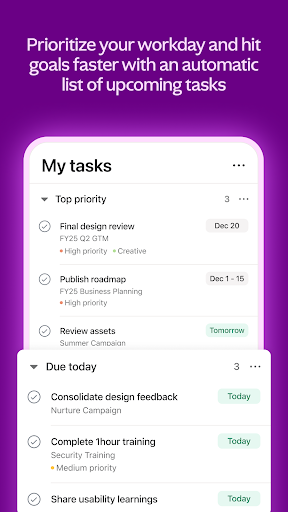
Asana's task management system acts like a digital to-do list on steroids. You can create tasks with detailed descriptions, attach files, set deadlines, and assign responsibilities with just a few clicks. Tasks can be viewed in multiple formats—list, board, timeline, or calendar—catering to different workflow styles. This flexibility allows teams to customize their workspace to match their natural collaboration rhythm, whether they prefer kanban boards or Gantt charts.
Collaborative Features — Connecting the Dots in Teamwork
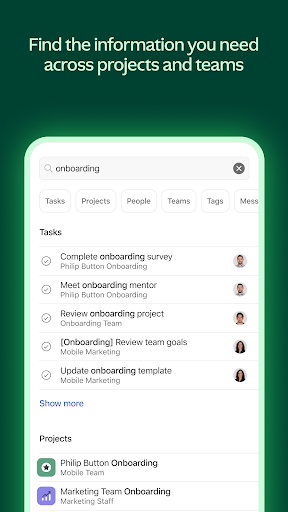
What makes Asana particularly appealing is its emphasis on collaboration. Users can comment directly on tasks, tag teammates, and share updates in real-time, transforming static project tracking into a lively conversation hub. The platform also enables team members to mention specific people or teams, bringing context directly into discussions, much like having a work chat embedded within your project plan. This reduces the need for scattered emails and streamlines communication threads.
Automation & Integration — Less Repetition, More Creation
Asana's automation tools are its secret sauce, allowing repetitive tasks—such as assigning follow-ups or updating statuses—to be handled automatically. Its integration with tools like Slack, Google Drive, Microsoft Teams, and more creates a centralized hub for all workflows—imagine having your entire work environment synchronized perfectly, reducing friction and boosting efficiency.
Unique Advantages & Final Recommendations
Compared to competitors like Trello or Jira, Asana's standout feature is its balanced focus on both task management simplicity and powerful collaboration capabilities. Its ability to visualize progress through multiple views (lists, boards, timelines) makes it adaptable for varied team preferences. Moreover, its intuitive interface lowers the barrier for new users, enabling quicker adoption.
For teams that prioritize seamless collaboration and need a flexible yet robust platform, Asana offers a compelling solution. Its automation features and integrations help teams become more self-sufficient, letting them focus on creative problem-solving rather than administrative chores.
While it may be more feature-rich and complex than some lightweight competitors, for organizations aiming for a comprehensive project ecosystem, Asana is worth exploring further. It's especially suitable for teams that value transparency, real-time communication, and the ability to track multiple projects simultaneously.
Final Tally
In sum, I recommend Asana for teams seeking a highly adaptable, user-friendly project management tool that emphasizes collaboration and automation. Beginners will appreciate its gentle learning curve, while power users will find plenty of depth to leverage. Whether you're coordinating remote teams or streamlining internal projects, Asana stands out as a reliable partner—connecting work and inspiring teams to succeed together.
Pros
Intuitive Task Management
Users can easily organize and prioritize tasks with a clean, user-friendly interface, boosting productivity.
Robust Collaboration Features
Asana allows seamless team communication and file sharing, enhancing team coordination.
Wide Integration Options
Supports integration with tools like Slack, Google Drive, and Outlook, streamlining workflows.
Customizable Workflows
Offers flexible project templates and automation to adapt to various team needs.
Mobile Accessibility
Full-featured mobile app enables work on the go, maintaining productivity outside the office.
Cons
Steep Learning Curve (impact: medium)
New users may find the extensive features overwhelming initially.
Limited Free Version (impact: high)
Some advanced features are only available in paid plans, which might restrict small teams.
Notification Overload (impact: medium)
Frequent alerts can become distracting; users can customize notification settings as a workaround.
Advanced Features Require Training (impact: low)
To effectively utilize automation and reporting tools, additional training may be necessary.
Occasional Sync Delays (impact: low)
Syncing between devices can sometimes lag, but official updates aim to improve real-time sync.
Asana: Where work connects
Version 8.81.2 Updated 2026-02-07



















