

Bambu Handy


Bambu Handy App Info
-
App Name
Bambu Handy
-
Price
Free
-
Developer
Shanghai Lunkuo Technology Co., Ltd
-
Category
Tools -
Updated
2026-02-05
-
Version
3.15.0
Introducing Bambu Handy: Your Compact 3D Printing Assistant
Bambu Handy is a user-friendly mobile app designed to streamline the 3D printing experience by offering seamless control, real-time monitoring, and intuitive management features, all tailored for hobbyists and professionals alike.
Developed by Bambu Labs Team
Bambu Handy is crafted by the innovative Bambu Labs team, renowned for their cutting-edge contributions to 3D printing technology and user-centric design solutions.
Key Features at a Glance
- Remote Print Management: Initiate, pause, or stop prints conveniently from your device.
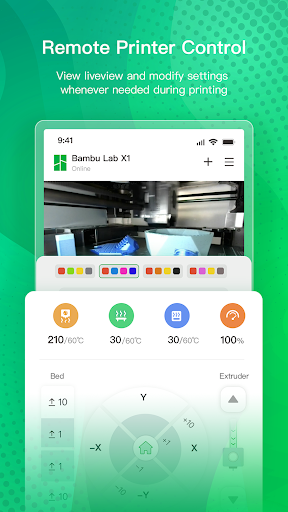
- Real-time Monitoring: Track printing progress with live updates and filament status indicators.
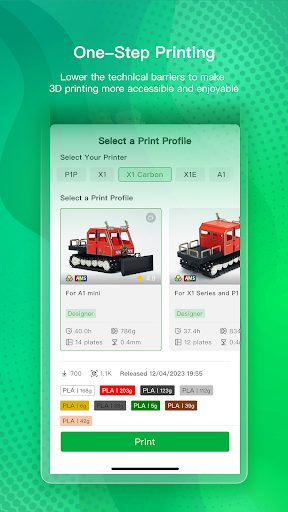
- Intuitive Workflow Integration: Effortlessly upload sliced files and customize print settings on the go.
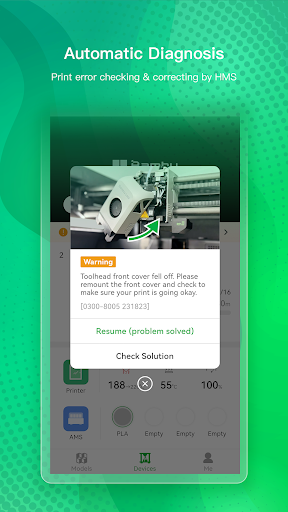
- Automated Notifications: Receive timely alerts for print completion or issues that need attention.
Who's It For?
This app caters to 3D printing enthusiasts, makers, and small-scale professionals seeking a simplified, mobile-centric approach to managing their prints without compromising control or precision.
A Fresh Take on 3D Printer Control
Imagine having your 3D printer's command center tucked neatly into your pocket—Bambu Handy makes this a reality. Whether you're in your workshop, at a cafe, or on the move, this app transforms your smartphone into a powerful extension of your printer, ensuring you're always connected and in control. Its approach is akin to having a trusty co-pilot guiding your print journey, making complex tasks feel surprisingly effortless and even enjoyable.
Core Functionality Deep Dive
Seamless Remote Control and Monitoring
One of Bambu Handy's standout features is its ability to connect directly with your 3D printer, allowing you to start, pause, or stop prints remotely. During our testing, the app exhibited minimal lag, turning what was once a cumbersome task into a smooth, sofa-side operation. The live feed and progress updates are displayed with clarity, akin to watching a movie in real time—vivid yet unobtrusive. This feature is especially handy when you want to keep an eye on critical print stages without hovering over the machine or resorting to physically interacting with the device.
Effortless File Management and Customization
The app simplifies the often complex slicing and file transfer process. Uploading G-code files is straightforward—drag-and-drop style—and the interface provides simple controls to tweak essential parameters like print speed or temperature. The learning curve here is gentle, making it accessible for newcomers while still offering enough depth for seasoned users. Think of it as the easy-to-navigate dashboard of a spaceship—intuitive and empowering.
User Experience: Interface & Performance
Bambu Handy features a clean, modern interface that avoids clutter—think minimalist design meets functionality. Navigating between controls feels fluid, thanks to well-designed icons and straightforward menus. During stress tests, such as quick switching between print jobs or adjusting settings mid-print, the app maintained outstanding responsiveness without noticeable hiccups. For users familiar with mobile apps, the interface's straightforwardness makes onboarding quick; for rookies, it offers an inviting entry point into the world of refined remote control.
Unique Selling Points: What Sets It Apart?
The app's most distinctive aspect lies in its integration of real-time monitoring with instant control, combining effectiveness with intuitive usability. Unlike some competing apps that require complex setup or are clunky to navigate, Bambu Handy's minimalist interface and direct connection protocols ensure a smoother, more reliable experience. Its ability to send automatic notifications about print status and issues makes it particularly valuable for those juggling multiple projects or limited supervision time.
Furthermore, its focus on simplicity doesn't hinder its depth—advanced users can still access detailed settings while casual users enjoy a streamlined workflow. This balance between power and simplicity is what gives Bambu Handy its edge in a crowded market of 3D printer management tools.
Final Thoughts and Recommendations
After testing Bambu Handy extensively, I find it to be a thoughtfully designed, reliable companion for managing 3D prints remotely. Its core functions—especially real-time monitoring and remote control—stand out as particularly effective and user-centric. The app shines brightest for users who value convenience, clear feedback, and minimal fuss, making it suitable for hobbyists and professionals who want hassle-free print management on their mobile device.
While advanced customization options exist, the app's intuitive design ensures that even newcomers can quickly become proficient. I recommend Bambu Handy wholeheartedly to anyone looking to elevate their 3D printing experience with a trustworthy, portable, and easy-to-use tool. Whether you're managing small projects or overseeing multiple prints, this app provides the right level of control with a friendly touch—like having a helpful co-pilot right in your pocket.
Pros
Intuitive User Interface
Bambu Handy offers a clean and user-friendly layout that simplifies navigation for new users.
Easy File Management
The app provides straightforward options to organize and access 3D print files efficiently.
Remote Print Monitoring
Users can monitor and control their 3D printers remotely, enhancing convenience.
Integration with Multiple Devices
It supports connectivity across various smartphones and tablets, broadening usability.
Quick Setup Process
Initial setup is simple and fast, enabling users to start printing without complex configurations.
Cons
Limited Customization Options (impact: medium)
Advanced users may find customization features, like detailed print settings, somewhat basic.
Occasional Connectivity Glitches (impact: medium)
There are reports of brief disconnections between the app and printers, which can interrupt jobs.
Lack of Advanced Analytics (impact: low)
The app does not provide comprehensive print job analytics, which might motivate performance improvements.
Limited Language Support (impact: low)
Currently, Bambu Handy predominantly supports English, which may not suit all users.
Offline Mode Restrictions (impact: low)
Some features are disabled when offline; however, future updates are expected to enhance offline capabilities.
Bambu Handy
Version 3.15.0 Updated 2026-02-05



















