

Hobnob - Invitation Card Maker

Hobnob - Invitation Card Maker App Info
-
App Name
Hobnob - Invitation Card Maker
-
Price
Free
-
Developer
Hobnob Events
-
Category
Events -
Updated
2025-11-23
-
Version
4.3.16
Hobnob - Invitation Card Maker: A Refreshing Take on Event Invitations
If you've ever tried to craft an invitation that balances elegance with ease, Hobnob stands out as a user-friendly solution designed to make celebration planning more delightful. Developed by a dedicated team passionate about creative expression, this app offers a streamlined way to produce beautiful, personalized invitation cards effortlessly. Whether you're planning a wedding, birthday, or corporate event, Hobnob's primary appeal lies in its intuitive design tools, flexible customization, and thoughtful reminder features—all tailored for users who want professional results without the fuss.
Core Functionality Highlights: Making Invitation Design a Breeze
Versatile Design Templates and Customization Options
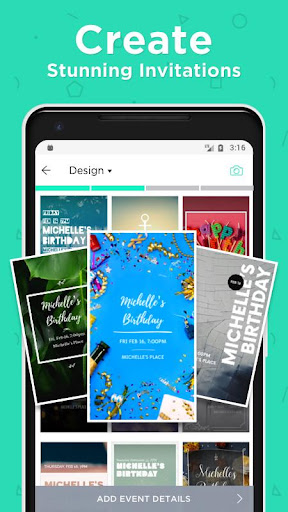
Hobnob provides an extensive library of beautifully crafted templates suitable for a wide array of occasions. From rustic-themed weddings to sleek corporate gatherings, the templates serve as a springboard for your creativity. What makes Hobnob particularly appealing is its granular customization tools—allowing users to tweak fonts, colors, images, and layout with just a few taps. This flexibility ensures that every invitation feels uniquely personal, yet professionally polished.
Intelligent Event Reminder and Sharing Features
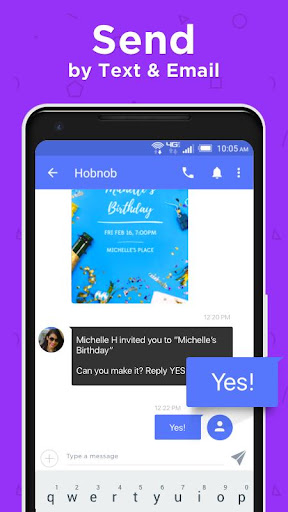
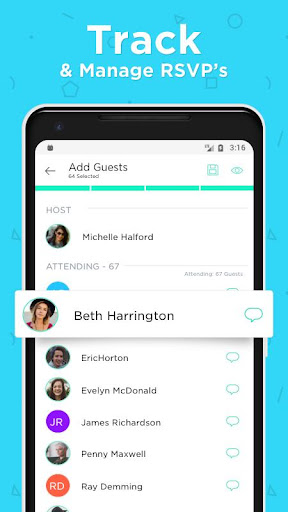
One of Hobnob's standout features is its integrated reminder system, which helps hosts manage RSVP deadlines and send timely notifications to invitees. The app not only reminds guests about upcoming events but also offers seamless sharing options—via email, messaging apps, or social media—making distribution both quick and effortless. Its focus on reminder precision and easy sharing is a game-changer for busy organizers who prefer automation without losing the human touch.
Clean, User-Centric Interface and Smooth Workflow
The app's interface is like a well-organized artist's palette—bright, inviting, and intuitive. Navigating between design, preview, and sharing modes feels like flipping through pages of a well-loved photo album. Transition times are minimal, and the drag-and-drop editing experience is buttery smooth, making it accessible even for first-time users. The learning curve is gentle; most users can get comfortable within minutes, which is ideal for those who want quick results without drowning in complexity.
What Sets Hobnob Apart from Its Competitors?
While many event planning apps focus primarily on task management or schedule tracking, Hobnob zeroes in on the creative process of invitation making, positioning itself as a specialist. The key difference lies in its combination of detailed customization and integrated reminder features—something that truly bridges the gap between aesthetic appeal and functional practicality.
Specifically, the app's most notable advantage is its ability to create detailed, personalized invitations while simultaneously managing guest engagement through smart reminders. This dual focus allows hosts to maintain oversight of both design quality and event logistics, reducing the chances of overlooked RSVP deadlines or miscommunications.
Recommendation and Usage Tips
Overall, Hobnob is highly recommended for anyone seeking to elevate their event invitations from average to eye-catching without diving into complex graphic design software. It's especially suitable for small businesses, event planners, or individuals who value a hassle-free yet customizable experience. For optimal use, spend a few minutes exploring the available templates and experiment with the customization options to find your style—once familiar, you'll find it's almost like having a personal graphic designer at your fingertips.
Whether you're preparing a wedding invite that whispers elegance or a casual get-together with a playful vibe, Hobnob delivers high-quality results with minimal effort. Its user-centric approach and unique combination of creative freedom and reminder automation make it another valuable tool in your event planning arsenal.
Pros
User-friendly interface
The app offers an intuitive design that makes creating invitations quick and easy for users of all skill levels.
Extensive template library
Hobnob provides a wide variety of professional templates suitable for different occasions, saving users time on design.
Customization options
Users can personalize cards with their own images, text, and colors for a unique touch.
Export and sharing features
Easily export high-quality invitations or directly share them via social media platforms.
Affordable pricing plans
Offers competitive subscription options that cater to casual users and professionals alike.
Cons
Limited free templates (impact: Medium)
Most premium templates require a payment, which may discourage free users.
Occasional app crashes (impact: Medium)
Users have reported occasional crashes, especially when using custom images or extensive edits.
Basic editing tools (impact: Low)
While functional, editing options are somewhat limited compared to more advanced design software.
No native mobile app currently (impact: Low)
The app is primarily web-based or desktop-oriented, which might limit mobile convenience; an official app is expected in future updates.
Template customization options could improve (impact: Low)
Some users desire more advanced editing features like layering or font management; official updates may enhance this in upcoming versions.
Hobnob - Invitation Card Maker
Version 4.3.16 Updated 2025-11-23



















