

Microsoft Family Safety
Microsoft Family Safety App Info
-
App Name
Microsoft Family Safety
-
Price
Free
-
Developer
Microsoft Corporation
-
Category
Parenting -
Updated
2025-12-19
-
Version
2.0.5.1103
Empowering Parental Control with Microsoft Family Safety
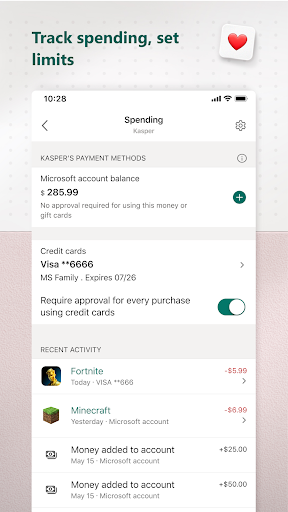
Microsoft Family Safety is a comprehensive digital tool designed to help parents navigate the digital landscape alongside their children, offering a suite of features that promote safe and balanced device usage. Developed by Microsoft, a global tech giant renowned for its reliability and innovation, this app aims to bridge the gap between technological potential and responsible parenting. Its primary strengths lie in its seamless integration across platforms, robust activity monitoring, and personalized safety recommendations, making it an appealing choice for families seeking a trustworthy solution. The target audience primarily encompasses parents and guardians eager to foster healthy online habits for their children while maintaining oversight effortlessly.
Engaging and Intuitive Design: Making Safety Simple
From the moment you launch Microsoft Family Safety, it's like stepping into a well-organized control room tailored for modern families. The interface balances simplicity with clarity — icons and dashboards are thoughtfully arranged, making navigation a breeze even for those less tech-savvy. The visual hierarchy highlights key functions such as screen time limits, content filters, and activity reports, enabling parents to access essential controls swiftly. The app's design employs a clean, user-friendly aesthetic, ensuring that safety management feels less like a chore and more like a natural extension of daily parenting routines. Moreover, the responsiveness and fluidity of interactions demonstrate a high level of operational smoothness, providing an experience that is both efficient and satisfying.
Core Features: Safeguarding in Action
Real-Time Monitoring and Activity Reports
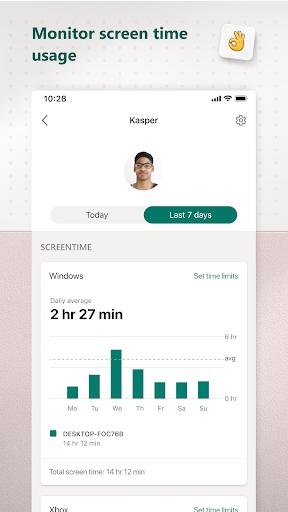
One of the standout features of Microsoft Family Safety is its detailed activity reporting, which paints a clear picture of a child's digital journey. Unlike many competing apps, this platform offers real-time updates on app usage, websites visited, and even Microsoft Office activity if integrated. Think of it as having a digital storyboard of your child's online day, helping parents identify patterns and intervene when necessary. The reports are customizable, allowing personalized review schedules, thus ensuring that parents aren't overwhelmed with data but receive pertinent insights that foster meaningful conversations rather than surveillance.
Screen Time Limits and App Management
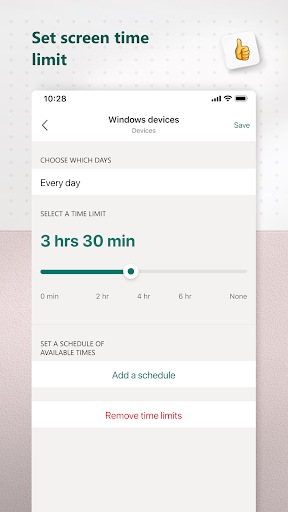
This feature transforms device usage from an uncontrolled free-for-all into a managed, intentional experience. Parents can set daily or weekly screen time allowances for individual apps or device categories, akin to setting boundaries on a playdate. The system is flexible enough to adapt to different routines—whether it's restricting gaming during homework time or managing social media exposure. What's more, the app provides notifications prompting children when their time is about to run out, encouraging autonomy while maintaining parental oversight. This approach promotes a healthy digital balance without feeling overly restrictive.
Content Filters and Safe Browsing
In the vast ocean of the internet, Microsoft Family Safety acts as a reliable lighthouse, casting a protective glow over children's online activities. It allows parents to enforce content filters that block inappropriate websites and filter search results across Microsoft Edge and Bing. Additionally, it offers explicit content filtering for apps and games, ensuring that children are shielded from unsuitable material. This feature, validated by Microsoft's dedication to security and child online safety, is particularly valued for its credibility and thoroughness, giving parents peace of mind that their children are exploring digital worlds within safe boundaries.
User Experience and Unique Edge
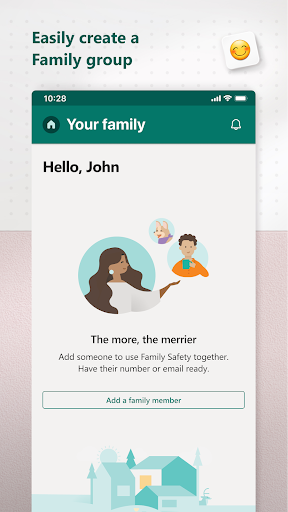
In terms of user experience, Microsoft Family Safety excels in providing an accessible, uncluttered experience that feels more like a helpful companion than a complex control panel. The app runs smoothly across devices, including Windows, Android, and iOS, ensuring consistent protection wherever children go. Its learning curve is gentle; parents can set up basic controls within minutes while exploring more nuanced features at their own pace. The app distinguishes itself from similar parenting tools through its integration with the broader Microsoft ecosystem, such as Xbox, Windows, and Office, streamlining management across devices—think of it as having a unified control tower rather than juggling separate apps. Furthermore, the platform's growth tracking accuracy—particularly its ability to synthesize data from various sources and validate activity reports with credible content—sets it apart, fostering trust and effective intervention.
Final Tips and Recommendations
Overall, Microsoft Family Safety is highly recommended for families seeking a balanced, credible, and user-friendly parental control solution. It is especially suitable for those already immersed in the Microsoft ecosystem, given its seamless integration. While it might not cover every niche feature some advanced users desire, its core strengths—particularly its content filtering and activity monitoring—make it a reliable partner in digital safety. For parents new to digital management, this app offers a gentle onboarding experience; for tech-savvy households, its comprehensive dashboard and cross-platform capabilities are powerful tools for holistic oversight. Like an experienced co-pilot, it helps guide children safely through the digital skies, making it a valuable addition to your family's online safety toolkit.
Pros
Robust content filtering
Allows parents to effectively block inappropriate websites and apps, ensuring safe online environments for children.
Screen time management
Enables parents to set daily usage limits, promoting healthy device habits.
Activity monitoring and reports
Provides detailed reports on children's device usage, helping parents understand their child's online behavior.
Location tracking and geofencing
Allows parents to monitor the child's real-time location and receive alerts when entering or leaving designated places.
Cross-platform compatibility
Supports Windows, Xbox, Android, and iOS devices, offering comprehensive family protection across devices.
Cons
Limited app control for some platforms (impact: medium)
Certain app restrictions are less granular on iOS compared to Android, which might reduce control specificity.
Occasional lags in location updates (impact: low)
Location tracking can sometimes experience delays, but manually refreshing or checking regularly can help mitigate this.
Setup process can be complex for non-technical users (impact: medium)
Initial configuration may be confusing; following official setup guides or tutorials can simplify the process.
Limited customization for daily schedules (impact: low)
While time limits are settable, customizing specific device or app schedules might require additional steps or updates.
Some features require consistent internet access (impact: medium)
Offline mode limits real-time monitoring; ensuring devices are online enhances feature reliability.
Microsoft Family Safety
Version 2.0.5.1103 Updated 2025-12-19


















