

Pixl - Face Retouch & Blemish


Pixl - Face Retouch & Blemish App Info
-
App Name
Pixl - Face Retouch & Blemish
-
Price
Free
-
Developer
Selfie Photo Editor & Vintage Filters
-
Category
Beauty -
Updated
2023-03-22
-
Version
1.0.14
Introducing Pixl - Face Retouch & Blemish: Your Personal Beauty Toolbox
Pixl - Face Retouch & Blemish is a professional-grade mobile application designed to effortlessly enhance and refine your facial features, making every selfie look flawless without the hassle of complex editing—think of it as your personal beauty assistant in your pocket.
Developed by a dedicated team passionate about advanced image processing
Created by a skilled team of developers specializing in AI-powered photo editing tools, Pixl combines robust algorithms with user-friendly design to deliver high-quality retouching with minimal effort.
Key Features that Make Pixl Stand Out
- Deep Learning-Driven Retouching: Utilizes advanced neural networks for natural-looking skin smoothing and blemish removal.
- Customizable Beauty Enhancements: Allows fine-tuning of facial features for a personalized touch, accommodating diverse preferences.
- Intelligent Detection & Editing: Precisely identifies skin imperfections, wrinkles, and blemishes for targeted editing without over-processing.
- High-Resolution Preservation: Maintains image quality, ensuring crisp and professional results even after multiple edits.
Bright Beginnings: Making Faces Perfect with a Smile
Picture the perfect selfie—you're confident, smiling, and ready to share. But perhaps there's a tiny blemish or uneven skin tone that distracts from your glow. Pixl emerges as your discreet magic wand, transforming everyday photos into magazine-worthy images with just a few taps. Its user-friendly interface and intelligent tools venture beyond simple filters, stepping into the realm of professional retouching—yet, it's so intuitive that even a newbie can feel like a top-tier editor.
Skin Smoothing and Blemish Removal: Gentle, Precise, and Realistic
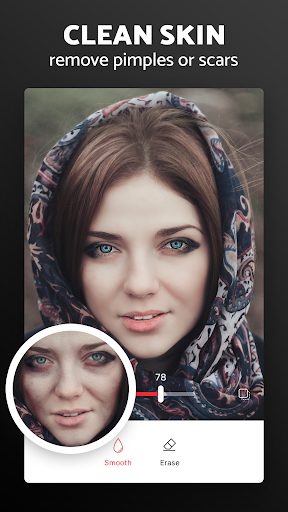
At the heart of Pixl lies its deep learning-powered skin smoothing feature. Unlike some apps that overdo the effect, turning faces into plastic masks, Pixl's AI carefully analyzes skin textures and applies subtle, natural enhancements. It detects blemishes, spots, and uneven tones, then seamlessly erases or diminishes these imperfections while respecting the original skin texture. Imagine softly polishing a gemstone without losing its natural sparkle—that's how Pixl's skin retouching works. The results are smooth, clear skin that looks perfectly natural rather than artificially airbrushed.
Facial Feature Adjustment: Personalization with Precision
This feature empowers users to fine-tune facial features—slightly enlarging eyes, adjusting jawlines, or refining nose shapes—offering a level of personalization that rivals professional editing software. What's remarkable is its ability to preserve authenticity; adjustments are subtle and intelligent, avoiding the uncanny valley effect. For example, if you prefer a more defined cheekbone or a softer chin, Pixl enables these modifications with sliders that respond smoothly and predictably, making customization accessible and satisfying for both casual users and enthusiasts.
User Experience: Smooth, Intuitive, Friendly
From the moment you open Pixl, it welcomes you with its clean and minimalistic interface—bright and uncluttered, like a well-organized workspace ready for your creativity. Navigating through tools is effortless; selections are snappy, and the app's responsiveness feels like flipping through a deck of cards—light and fluid. The learning curve is gentle; even newcomers can quickly grasp the core functionalities, thanks to contextual hints and simple tutorials embedded in the app. Whether you're a seasoned photographer or a casual selfie-taker, Pixl adapts seamlessly, making the editing process as relaxing as a walk in the park.
What Sets Pixl Apart from Other Beauty Apps?
Many apps parade their features with catchy promises, but what truly elevates Pixl is its commitment to realistic results and precise personalization. Its deep understanding of facial anatomy and skin textures enables it to distinguish between a need for a gentle touch and over-processing, setting it apart in a crowded market. Compared to apps that rely solely on presets or generic filters, Pixl offers a deeply layered approach—think of it as a master chef customizing a recipe just for you, rather than serving a one-size-fits-all dish. Its high-fidelity retouching preserves high-resolution detail, making it suitable for professional use or social media showcasing with confidence.
Recommendation and Usage Tips
If you're seeking a reliable, nuanced retouching app that balances professionalism with ease of use, Pixl deserves a spot in your toolkit. It's particularly recommended for users who value authentic appearance and personalized adjustments over superficial beautification. Whether for personal social media posts, professional headshots, or just enhancing your daily photos, Pixl offers an excellent blend of power and simplicity.
For the best results, start with gentle adjustments—less is often more with natural beauty. Take advantage of the app's preview features to compare before-and-after images, ensuring your edits enhance but don't distort your unique features. Remember, the goal is subtle refinement, allowing your personality and authenticity shine through.
In summary, Pixl - Face Retouch & Blemish is a thoughtfully crafted app that elevates mobile portrait editing to a professional level. Its standout features—particularly its intelligent blemish detection and personalized facial adjustments—make it a true game-changer for anyone who loves looking their best in photos, without losing their natural charm.
Pros
Intuitive and user-friendly interface
Even beginners can easily navigate and apply retouching features without a steep learning curve.
Effective blemish removal tools
Quickly smooth out skin imperfections like acne or scars for natural-looking results.
Real-time preview feature
Allows users to see changes instantly before applying, ensuring desired results.
Multiple editing options
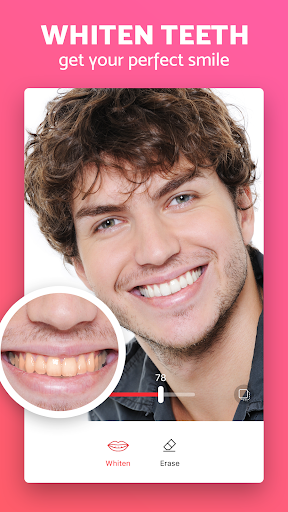
Offers a variety of tools such as skin smoothing, whitening, and reshaping, catering to different needs.
Lightweight and fast performance
Loads quickly and processes images smoothly without lag, even on lower-end devices.
Cons
Limited customization controls (impact: medium)
Advanced users might find the editing options somewhat basic, lacking fine-tuning capabilities.
Occasional over-smoothing (impact: high)
Skin can sometimes appear unnaturally plastic unless adjustments are carefully managed; using subtle settings can mitigate this.
Watermark on free version (impact: low)
The free version adds a watermark, but users can opt for a paid plan or crop it out as a temporary workaround.
Limited editing effects beyond skin retouch (impact: low)
Does not provide extensive artistic filters; future updates may expand these options.
Occasional difficulty in detecting blemishes in challenging lighting (impact: medium)
Minor inaccuracies in blemish removal, but users can manually adjust for better results; improvements are expected in future updates.
Pixl - Face Retouch & Blemish
Version 1.0.14 Updated 2023-03-22


















