

Ringtone Maker:create ringtone
Ringtone Maker:create ringtone App Info
-
App Name
Ringtone Maker:create ringtone
-
Price
Free
-
Developer
Big Bang Inc.
-
Category
Personalization -
Updated
2026-02-02
-
Version
Varies with device
Ringtone Maker: Create Custom Ringtones with Ease and Precision
Ringtone Maker: Create ringtone is a versatile mobile application designed to empower users to craft personalized ringtones effortlessly. Developed by a dedicated software team, this app combines intuitive design with powerful editing tools to elevate your customization experience — making it ideal for music enthusiasts and casual users alike who want their phone sounds to stand out.
Key Features That Make It Stand Out
At its core, Ringtone Maker excels in providing a seamless, feature-rich environment for creating unique ringtones. Its primary highlights include a precise audio editing interface that supports multiple formats, an extensive library of built-in sound effects, and advanced customization options that cater to varied aesthetic preferences. Additionally, the app offers easy sharing capabilities, allowing you to instantly set your creations as ringtones or share them across platforms, making the process both fun and efficient.
Sparkling Features: Cutting-Edge Tools for Creative Freedom
Intuitive Editing and Precise Trim Controls
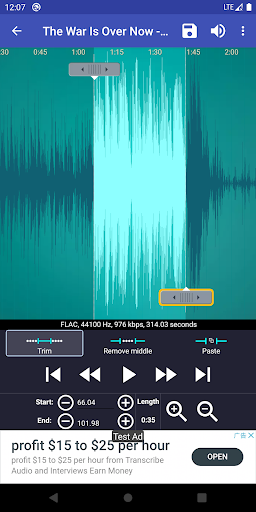
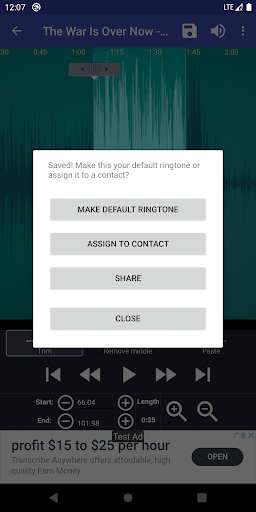
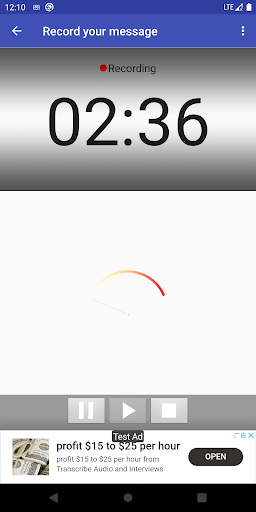
One of the most compelling aspects of Ringtone Maker is its user-friendly editing panel. Imagine sculpting a musical masterpiece with just your fingertips—dragging and pinpointing specific sections of your audio track. The app integrates waveforms that visually represent your sound, enabling precise trimming down to the millisecond. Whether you're repurposing a favorite song snippet or recording from scratch, this functionality eliminates guesswork, ensuring your ringtone sounds exactly how you envision it.
Rich Customization and Theme Compatibility
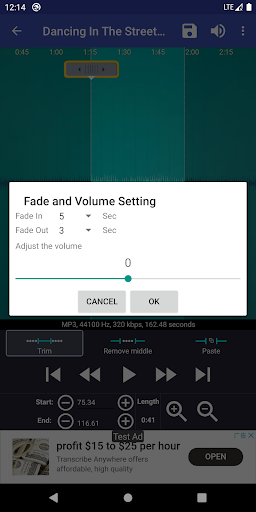
What truly elevates Ringtone Maker from similar apps is its extensive customization options. Beyond simple trimming, users can adjust volume levels, add fade-in and fade-out effects, and layer multiple sound effects to craft a truly distinctive tone. Plus, the app maintains broad theme compatibility—allowing you to pick interface skins or visual styles that suit your mood, enhancing the overall user experience. This focus on personalization makes every user feel like their ringtone is a handcrafted piece of art.
Library and Sharing Made Simple
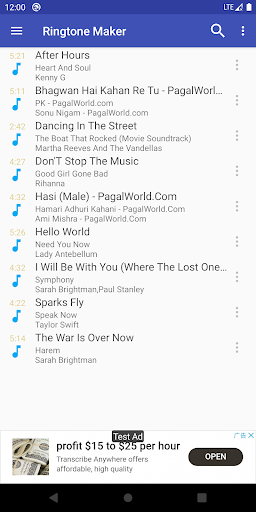
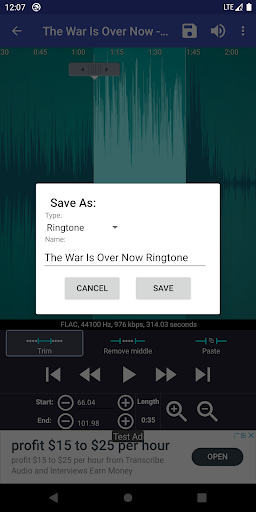
On top of powerful editing capabilities, this app offers a vast library of preset sounds and effects, giving those who prefer quick options a way to customize with a touch. Once the perfect ringtone is crafted, sharing functionality becomes a breeze: you can set the new tone directly as your device's ringtone, assign it to specific contacts, or export it to your preferred cloud storage. This integrated ecosystem reduces hassle and keeps the creative flow uninterrupted.
User Experience: Seamless, Friendly, and Learning-Friendly
From the moment you open Ringtone Maker, its clean, well-organized interface immediately catches the eye—smooth animations and clear icons make navigation intuitive, even for first-time users. The learning curve is gentle; with simple tutorials and tooltips, you're guided through each step. The app operates fluidly on most device configurations, with minimal lag when processing large audio files, ensuring a pleasant editing experience. Its thoughtful design transforms what could be a technical chore into an engaging creative session, much like painting on a digital canvas.
Comparison with Similar Personalization Apps: What Sets It Apart?
Many ringtone creation apps offer basic trimming features, but Ringtone Maker distinguishes itself through its comprehensive customization options and thematic flexibility. Unlike apps that stick to one style or limit choices to a handful of effects, this app provides an extensive variety of sound layers, effects, and aesthetic themes. Its focus on detail-oriented editing—allowing users to control volume curves, apply fine fade effects, and integrate external sounds—places it ahead in the personalization arena. Moreover, its user-centric design ensures that both tech-savvy users and beginners can produce polished ringtones without feeling overwhelmed.
Final Thoughts: A Recommended Pick for Creative Ringtone Enthusiasts
If you're someone who appreciates fine-tuned control over your phone's soundscape and enjoys crafting unique auditory signatures, Ringtone Maker is a tool worth exploring. Its standout features—especially the precise editing tools and extensive customization options—provide a compelling experience that balances power with simplicity. While it may not boast the absolute most advanced audio effects on the market, its user-friendly approach and aesthetic flexibility make it a strong recommendation for everyday users who want to personalize their devices effortlessly. For best results, allocate some time to explore its layered effects and theme options, and you'll soon be creating ringtones that truly reflect your personality.
Pros
Intuitive user interface
Easy for users to navigate and create ringtones without prior experience.
Fast editing capabilities
Allows quick trimming and editing of audio files, saving time.
Supports various audio formats
Enables importing and exporting in formats like MP3, WAV, and AAC.
Built-in preview feature
Users can listen to their ringtone before saving to ensure satisfaction.
Lightweight and low resource usage
Operates smoothly even on older devices without lag.
Cons
Limited editing tools (impact: low)
Lacks advanced features like fade-in/out or multiple cut points, which could benefit professional users.
No batch processing (impact: medium)
Cannot edit multiple files simultaneously, which may slow down bulk ringtone creation.
Occasional minor crashes on large files (impact: medium)
Runs smoothly most of the time but may crash when handling very long audio tracks; an update is expected to improve stability.
Limited export options (impact: low)
Does not support directly sharing to social media platforms; users can manually upload files after saving.
No built-in audio effects (impact: low)
Lacks features like echo or distortion; users may need external apps for advanced effects, which can be inconvenient.
Ringtone Maker:create ringtone
Version Varies with device Updated 2026-02-02



















