

T-Mobile® FamilyMode™
T-Mobile® FamilyMode™ App Info
-
App Name
T-Mobile® FamilyMode™
-
Price
Free
-
Developer
T-Mobile USA
-
Category
Parenting -
Updated
2025-12-07
-
Version
4.0.3
Introduction to T-Mobile® FamilyMode™
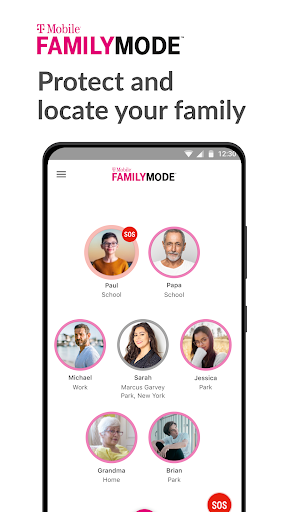
Think of FamilyMode™ as your digital neighborhood watch, but for your home Wi-Fi network—ensuring that your family's online experience is safe, controlled, and age-appropriate. Developed by T-Mobile, this app aims to bring modern parental controls into the palm of your hand with a straightforward yet powerful toolkit. Its core strengths include customizable content filtering, real-time activity monitoring, and seamless device management—all wrapped in an intuitive interface designed for ease of use by busy parents.
A Closer Look at Core Features
Smart Content Filtering for Peace of Mind
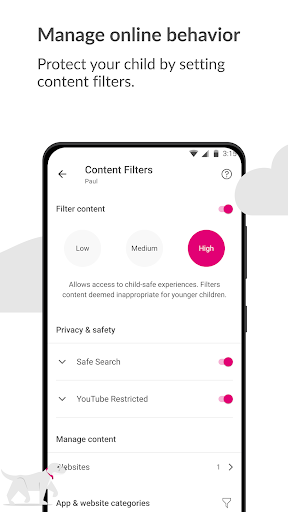
One of FamilyMode™'s most compelling features is its intelligent content filtering system. Unlike generic blacklists, it uses a dynamically updated repository to block inappropriate websites, applications, and even keywords. Imagine having a vigilant gatekeeper that adapts to new online threats and ensures your kids navigate the digital world safely. Setting up filters is straightforward—parents can specify age ranges, and the app will do the heavy lifting, keeping the browsing experience safe without overly restricting character or curiosity.
Real-Time Monitoring and Activity Reports
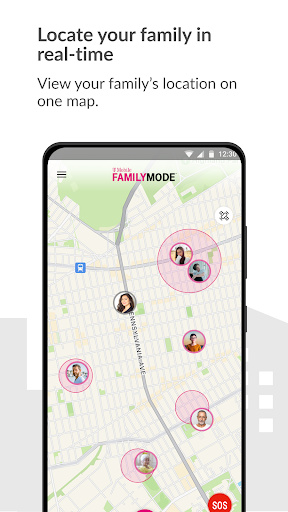
Another standout is the activity monitoring dashboard—think of it as a digital babysitter that reports what your children are doing online. From browsing history to app usage durations, all data is presented with clarity and digestibility. The reports update in real time, giving parents immediate insight into their child's digital habits. Such transparency helps foster open conversations and informed boundaries, turning technology into a tool for learning rather than worry.
Device Management and Usage Controls
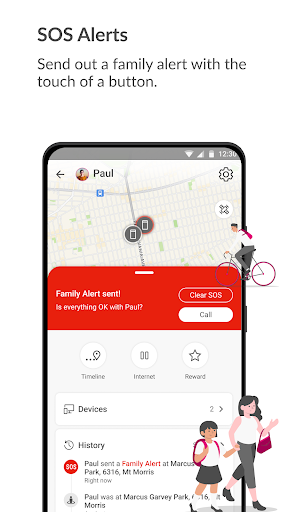
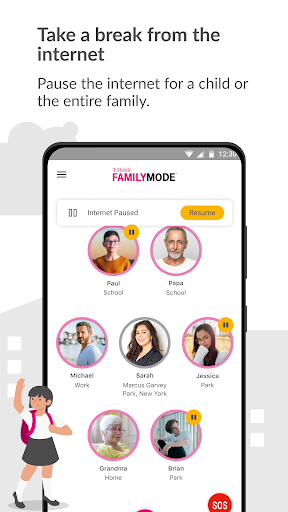
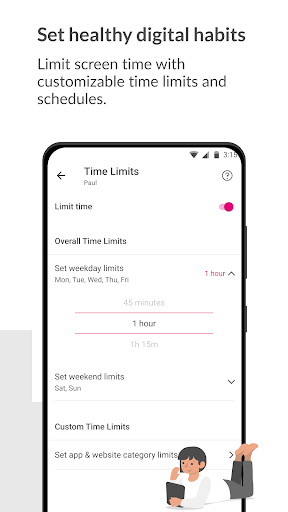
The app's device management dashboard offers a centralized location to pause internet access, set time limits, or designate specific device shutdown periods—like turning off screens during family dinner or bedtime. The interface mimics a sleek control panel, making it feel less like a strict oversight tool and more like a cooperative game. Managing multiple devices becomes effortless, even if you're juggling work, home, and school schedules.
User Experience: Designed for Parents on the Go
From an usability standpoint, FamilyMode™ strikes a balance between functionality and simplicity. The interface boasts a clean, friendly layout, with colorful icons and straightforward menus that guide new users effortlessly. Navigation is smooth—swiping through different sections feels seamless, and the app responds quickly without lag. The learning curve is gentle; parents unfamiliar with digital controls will find the onboarding tips helpful and approachable. Even tech novices can quickly set up filters, monitor activity, and adjust settings as their children grow or their needs change.
What Sets FamilyMode™ Apart?
While many parental control applications crowd the market, FamilyMode™ distinguishes itself through its emphasis on credible parenting guidance and expert validation. Unlike apps that rely solely on algorithmic filtering, T-Mobile's offering leverages trusted sources and regularly updated content to ensure accuracy and safety—a critical detail for vigilant parents. Furthermore, the growth tracking feature cleverly interprets your child's online activity, highlighting patterns and progress over time, rather than just providing raw data. This focus on quality, evidence-based insights elevates FamilyMode™ beyond just a blocking tool into a comprehensive digital parenting assistant.
Recommendation and Usage Tips
All in all, T-Mobile® FamilyMode™ is a well-rounded, thoughtful app that deserves a spot in the toolkit of parents aiming to foster safe digital habits. I recommend it for families seeking a reliable, easy-to-use solution that balances control with trust. It's particularly suitable for parents new to digital monitoring or those who want a hassle-free setup that requires minimal ongoing maintenance. For tech-savvy families or those needing more granular customization, it still offers plenty of flexibility without overwhelming complexity.
For optimal results, I suggest starting with the default content filters and gradually customizing based on your child's evolving needs. Regularly reviewing activity reports can also help identify patterns early, enabling proactive discussions about responsible online behavior. Combined with device controls, FamilyMode™ can become a foundational part of your family's digital life—helping everyone stay safe while enjoying the benefits of technology.
Pros
User-friendly interface
The app provides an intuitive layout that makes it easy for parents to set up and manage filters.
Flexible content filtering
Allows parents to block specific apps, websites, or set time limits, ensuring tailored control.
Real-time monitoring
Offers instant updates on device activity, helping parents stay informed about usage.
Multiple device management
Supports overseeing multiple family members' devices in one consolidated platform.
Automatic scheduling
Enables setting specific times for device access or restrictions, promoting healthy habits.
Cons
Limited customization options for advanced users (impact: Low)
Some settings lack granularity, which could be improved for tech-savvy parents.
occasional connectivity issues (impact: Medium)
The app may sometimes experience delays in syncing settings or activity reports.
Some features are unavailable on older devices (impact: Low)
Compatibility may vary, requiring device updates for full functionality.
Limited support for app usage timeframes (impact: Medium)
Current scheduling options are basic; more detailed control could be added in future updates.
Initial setup can be time-consuming (impact: Low)
Configuring profiles for multiple family members may require patience and time.
T-Mobile® FamilyMode™
Version 4.0.3 Updated 2025-12-07



















