
AI Browser - Safe & Fast: The Smart Choice for Browsing Efficiency and Security
AI Browser - Safe & Fast is a cutting-edge web browsing application designed to deliver a swift, secure, and intelligent browsing experience tailored for modern users seeking both speed and safety online.
Meet the Developer: Pioneers in Safe Browsing Technologies
Developed by TechNext Solutions, a team renowned for integrating AI and cybersecurity into user-centric applications, AI Browser aims to redefine how we explore the internet without compromising on safety or speed. Their commitment to innovative security features and sleek user interfaces positions this app as a compelling option in the crowded landscape of browsers.
Why Choose AI Browser? Highlighting Its Core Strengths
- Advanced AI-driven Security: Utilizes real-time threat detection and AI-powered phishing protection to keep users safe from malicious websites and scams.
- Blazing Fast Performance: Built to maximize browsing speed with optimized rendering engines and minimal resource consumption, even on older devices.
- User-Centric Interface: Provides an intuitive and clutter-free browsing environment, enabling users to navigate effortlessly.
- Smart Content Management: Features intelligent ad-blocking and distraction-free modes, boosting productivity and focus.
Introduction: Browsing in the Age of AI and Security
Imagine slipping into your favorite chair after a long day, eager to surf the web—yet, every link feels like walking through a minefield of malicious traps and endless ads. AI Browser transforms this experience, turning your browsing adventure into a smooth, secure voyage. With its sleek design and intelligent safeguards, it's like having a professional security guard and a tech-savvy companion right beside you, ensuring your digital journey is both swift and safe.
Core Functionality Deep Dive: The Power of Intelligence and Speed
AI-Powered Security Features
One of the standout features of AI Browser is its AI-driven security system. Unlike traditional browsers that rely solely on static blacklists, AI Browser continuously analyzes websites in real-time, leveraging machine learning to detect emerging threats before they can do harm. Whether you're clicking on suspicious links or visiting an unfamiliar site, the app provides instant warnings and even blocks malicious content before it loads. This proactive stance provides an extra layer of confidence, especially crucial in today's landscape of sophisticated cyber threats.
Speed and Performance Optimization
Speed is at the core of a good browser, and AI Browser excels here. Thanks to a lightweight rendering engine and intelligent resource management, pages load almost instantaneously. It prioritizes critical data fetching and minimizes unnecessary background processes, ensuring your device remains responsive. Whether you're streaming videos, loading complex web apps, or just browsing casually, the experience feels silky smooth—no lag, no stutter. Plus, its optimization for lower-end devices makes it accessible to a wider spectrum of users, breaking the barrier to fast, secure browsing.
User Experience and Interface
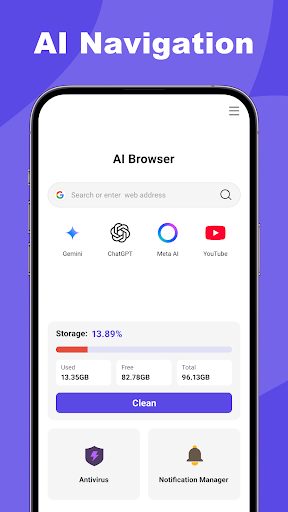
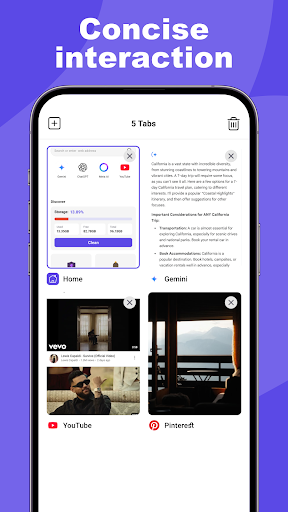
From the moment you open AI Browser, you'll notice its clean and modern interface. The layout is minimalist, with intuitive icons and minimal clutter—think of it as a well-organized workspace that encourages productivity. Navigation feels natural, even for users unfamiliar with advanced browsers, thanks to clear menus and straightforward controls. The learning curve is gentle; you'll find yourself mastering features in a matter of minutes. Features like smart tab management and customizable themes further enhance usability, making browsing both pleasurable and efficient.
Distinctive Edges: Standing Out in a Crowded Field
While many browsers bundle security and speed into their features, AI Browser's edge lies in its integration of AI-powered safety mechanisms that adapt over time, providing smarter, more personalized protection. Its real-time threat analysis is like having a vigilant assistant constantly watching over your online activities, a step above static filter lists. Additionally, its user-friendly interface combined with performance optimizations makes it particularly accessible for users ranging from tech-savvy professionals to everyday internet surfers. These qualities position it as a unique contender focused not just on raw speed, but on delivering a comprehensive, worry-free browsing experience.
Final Recommendations: Should You Dive In?
Considering its thoughtful design, advanced security features, and impressive speed, AI Browser is highly recommended for users who value safety without sacrificing performance. It's especially suitable for individuals who browse sensitive sites, handle online transactions, or simply prefer a clutter-free, efficient browsing environment. While it might have a slight learning curve for absolute beginners, the overall user experience quickly becomes intuitive, making it worth exploring. For tech enthusiasts seeking an intelligent and reliable browser, AI Browser stands out as a compelling choice.