





Cool Browser – AI & Fast Web: The Future of Browsing at Your Fingertips
Imagine a web browser that isn't just a window to the internet but a smart companion that accelerates your online experience with AI-powered features and lightning-fast performance. That's exactly what Cool Browser offers—a new breed of browsing that combines speed, intelligence, and user-centric design to transform how you access and interact with the web.
Developed by an Innovative Tech Team
Cool Browser is the brainchild of the talented developers at InnovateSoft Labs, a company dedicated to creating user-centric, high-performance software solutions. With a focus on integrating AI seamlessly into everyday tools, the team aims to redefine browsing by making it smarter, quicker, and more intuitive for users worldwide.
Key Features That Make Cool Browser Stand Out
- AI-Powered Search & Recommendations: Harnessing the power of AI, the browser offers smarter, more relevant search results and tailored content suggestions based on your browsing habits.
- Blazing Fast Speed: Thanks to optimized rendering engines and efficient resource management, Cool Browser ensures pages load almost instantaneously, minimizing waiting time and enhancing productivity.
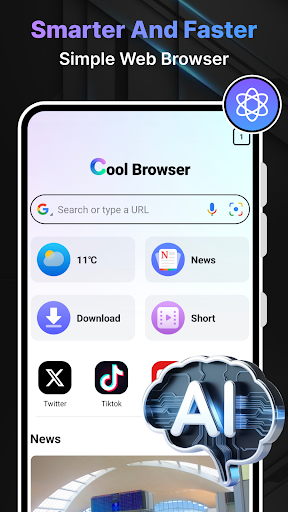
- Minimalist & Intuitive Interface: The clean, straightforward design removes clutter, enabling users to focus on what matters most—content and links—without distractions.
- Enhanced Privacy & Security: Built-in privacy tools guard your data with ad-blocking, tracker prevention, and encrypted browsing modes, giving you peace of mind online.
Dynamic User Experience & Core Functionalities
Browsing Made Intelligent with AI Assistance
Step into a world where your browser is more than a portal—it's a smart assistant. Cool Browser's AI-driven search engine actively learns from your browsing patterns, providing personalized content recommendations and quick answers right in your address bar. Instead of drowning in a sea of links, you get precise, contextually relevant suggestions that feel like chatting with a knowledgeable friend. This function is vibrant and highly responsive, turning your routine searches into engaging, productive encounters. For example, planning a trip? The AI not only shows relevant flight options but also extracts local tips and reviews, all seamlessly integrated into your browsing experience.
Speeding Ahead with Optimized Performance
Imagine trying to wade through molasses—frustrating, isn't it? Now, picture zipping through a paved highway instead. Cool Browser's core strength lies in its exceptional speed capabilities. Its lightweight rendering engine, combined with efficient resource allocation, ensures websites pop up faster than you can say "buffering." Whether it's streaming high-resolution videos or loading complex web apps, everything feels effortless and snappy. This speed isn't just about raw performance; it's about making your web navigation smoother and more delightful, even on slower networks or older hardware.
User Interface: Clean, Modern, and Friendly
If the internet user interface were a workspace, Cool Browser keeps it tidy, uncluttered, and inviting—like a neatly organized desk. The minimalist design focuses your attention on content while providing essential tools neatly tucked away. Navigation is intuitive; you'll find everything where you expect it, reducing the learning curve for new users. The smooth animations, customizable themes, and straightforward layout contribute to a pleasant browsing environment that feels natural and easy to master. It's akin to customizing your workspace so it fits *your* style and workflow perfectly.
What Sets It Apart from Competitors?
While many browsers tout their speed or security, Cool Browser's true standout feature is its integration of AI directly into the core browsing experience. Unlike Chrome or Firefox, which often require third-party extensions for AI capabilities, Cool Browser comes with built-in intelligent features that adapt to you. Its ability to deliver personalized content and quick, contextual responses makes browsing not just faster but smarter. Additionally, its emphasis on simplicity combined with powerful AI makes it accessible for users who prefer a streamlined experience without sacrificing functionality—a true balance of minimalism and intelligence.
Final Verdict: A Wise Choice for Curious and Efficiency-Seekers
I'd recommend Cool Browser to anyone who values speed, privacy, and a bit of smarts wrapped into one package. Whether you're a casual user, a researcher, or a professional looking for a quick and secure browsing solution, this app offers a compelling blend of features. Its most exceptional advantage—the AI-assisted browsing—is like having a personal guide navigating the vast digital landscape, cutting through the noise and delivering what truly matters to you. For those seeking a modern, efficient, and intelligent browser, Cool Browser is definitely worth a try, promising a faster, smarter, and more enjoyable web experience.