Meet the Little Widget That Packs a Surprising Punch
Let's be honest—when you search for “battery widget” in the App Store, you're wading into a sea of sameness. Most of these apps show you a green circle, a percentage, and call it a day. So when I stumbled upon Emoji Battery Widget, I expected another drop in that ocean. Instead, I found a tiny, cheerful tool that makes me *want* to check my battery level. It's not a game-changer in the grand scheme of tech, but it's a delightful quality-of-life tweak that's earned a permanent spot on my home screen.
Developed by a small indie studio that clearly cares about playful design, this widget takes the mundane act of checking your phone's juice and turns it into a micro-moment of fun. It's not trying to be a system optimizer or a battery health analyzer—it's purely about making the lock screen and home screen a little more expressive. And honestly? Sometimes that's all you need.
Why the “Emoji” Gimmick Actually Works
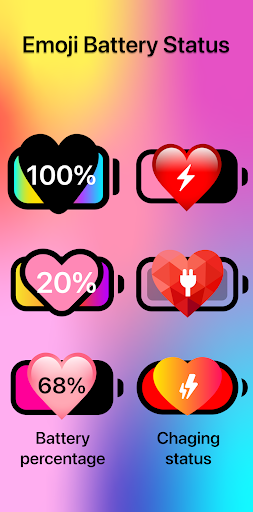
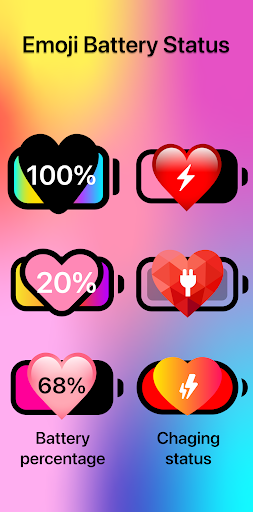
Here's the core hook: instead of a static battery icon, your remaining charge is represented by a living, breathing emoji face. When you're at 98%, you get a beaming, sunglasses-wearing grin. At 50%, it turns into a neutral, slightly tired face. Drop below 20%, and you'll see a sweaty, panicked face that perfectly mirrors your own anxiety when you realize you left your charger at home. It's silly, but it's also weirdly informative at a glance. You don't need to read the tiny number—you just need to glance at the emotion. That's genuinely smart design disguised as a joke.
What's more, the emoji isn't static during charging. Plug in your phone and the face swaps to a zen-like, pink-cheeked smile with little “zZz” floating around. It's a small touch, but it's these little personality shifts that make the widget feel alive, not just like a glorified percentage reader.
Beyond the Face: Customization That Respects Your Time
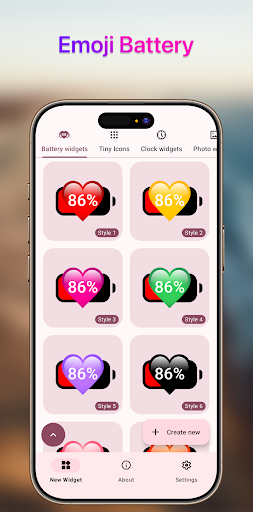
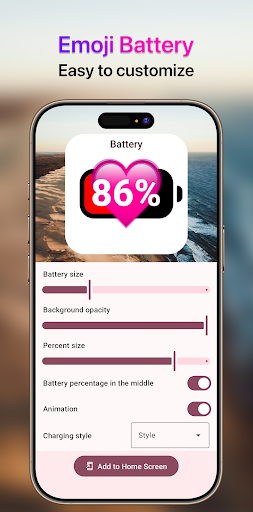
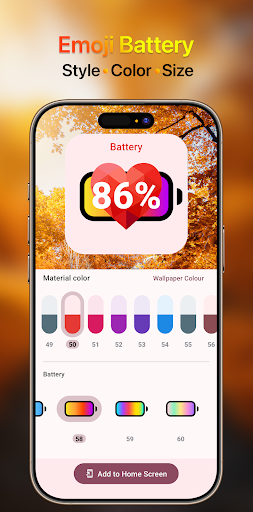
Many personalization apps drown you in a thousand options, most of which you'll never touch. Emoji Battery Widget takes the opposite approach—it gives you a curated handful of choices that actually change the look and feel. You can pick from a dozen emoji styles (including a robot, a cat, and a ghost), toggle between a circular or pill-shaped frame, and choose a background tint that matches your wallpaper. There's even a “minimal mode” that strips away the emoji face and leaves only a thin, color-changing progress line. That's it. Two minutes of tweaking, and you're done.
Theme compatibility is where this app quietly shines. Unlike many widgets that look like a glowing neon sticker slapped onto your dark-mode wallpaper, this one respects your aesthetic. It offers a true transparent background option that blends with most wallpapers, and the color-coded stages (green → yellow → red) are calibrated to be visible without screaming for attention. On a busy home screen, it's easy to spot; on a minimal setup, it doesn't feel like clutter.
Performance & Learning Curve: Set It and Forget It
I've tested widgets that crash, lag, or fail to update. This one is refreshingly boring in the best way. The widget refreshes in near real-time, with only a slight delay when you swipe to the home screen after a heavy gaming session. The setup process is equally painless—just add the widget, grant battery access via the system prompt, and you're done. No login, no account creation, no “premium subscription” nagging pop-ups. It's a rare, clean experience in a category that usually loves to throw a 14-day trial in your face.
For new users, the learning curve is essentially zero. If you can say “I want a different face,” you already know how to use it. There are no hidden swipes or long-press gestures to discover. It's the kind of app you set up in 45 seconds and then forget exists until it makes you smile on a low-battery Tuesday.
The Differentiator: Emotion Over Information
Here's where this app separates itself from the dozens of “Battery HD Pro” clones. Most personalization tools focus on *information density*—tons of stats, voltage readings, temperature graphs. Emoji Battery Widget focuses on *emotional resonance*. It turns a routine check into a tiny, personal interaction. When I'm at 15% on a late-night commute, seeing that tired, pleading face actually makes me chuckle instead of panic. That's a feeling that no graph or percentage can replicate.
Another subtle advantage is its transparency-friendliness with iOS's built-in smart stacks. The widget behaves nicely when rotated into a stack with weather or calendar widgets—it shrinks down without breaking the layout, and its bold colors don't clash with system fonts. It's clearly been built with attention to how actual users organize their screens, not just how it looks in a promotional screenshot.
Verdict: Who Should Grab This?
If you're someone who treats your home screen like a curated gallery, or if you just enjoy small, well-executed details in your daily tech, this is a no-brainer download. It's not a pro-tool for battery analysts, and it won't extend your battery life one bit—but it *will* make the 2 seconds you spend checking your phone feel a little less robotic.
My only caution is for users who prefer a dead-serious, utilitarian interface. If you find any trace of whimsy in your tools off-putting, this isn't for you. But if you're willing to embrace a little charm, Emoji Battery Widget is easy to recommend, completely free of annoying ads, and worth a permanent slot on your home screen. Give it a week. I bet you won't switch back to a plain circle.