
Your Crisis Comms Co-Pilot, Now With a Human Touch
Let's be honest: when I first opened Everbridge, I expected a clunky, enterprise-grade dashboard that felt like a government paperwork simulator. Instead, I found a tool that feels less like a siren and more like a calm, very well-organized friend who happens to have a master key to every emergency channel. This isn't an app you open for fun—it's the app you pray you never need, but when you do, it's the difference between chaos and coordinated action.
Meet the Silent Operator
Everbridge is a critical event management (CEM) platform that turns mass notification into a surgical operation. Developed by the Massachusetts-based company of the same name (with a strong DNA from the old "3n Global" acquisition), it's now the de facto standard for Fortune 500 firms, hospitals, universities, and even government agencies like FEMA. Its core promise isn't just "send a text blast"—it's "deliver the right message, to the right people, on the right device, at the exact moment they need it."
Primary highlights include:
- Two-way dynamic polling: Not just broadcasting at people, but actively collecting real-time status safety confirmations.
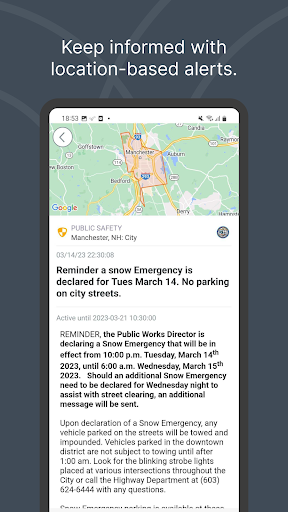
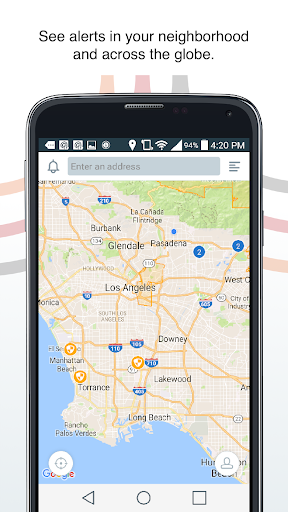
- Location-based smart routing: If a chemical spill happens at your Chicago office, it doesn't bother your Tokyo branch—until their supply chain is affected.
- Omnichannel delivery: Push, SMS, voice call, email, desktop pop-up, even digital signage—if your phone is off, it will call your mom's landline (hyperbole, but you get the idea).
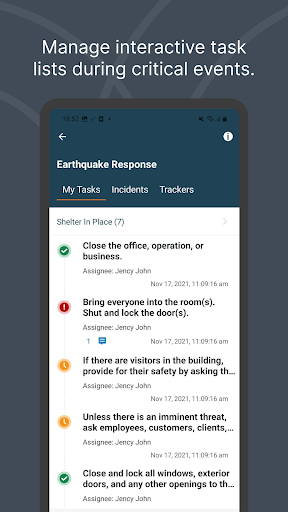
- Automated playbooks: Think "if-then" logic meets incident response checklists, so your team doesn't have to think under adrenaline.
Target audience: This is not for your group chat organizer. It's for business continuity managers, security operations leads, IT incident commanders, and anyone responsible for keeping a thousand or ten thousand people safe and informed during outages, weather disasters, or active threats.
When Every Second Feels Like a Slow-Motion Plague
Now, let's talk about the real meat—the features that made me genuinely nod my head like a bobblehead while testing (in a sandbox simulation, not an actual crisis, thank heavens). The two standouts are the “Safety Check” with live geofencing and the “Scenario-Based Automation”—they're not just bells and whistles; they redefine what a "communication app" can do.
Safety Check: The Digital Roll Call That Doesn't Nag
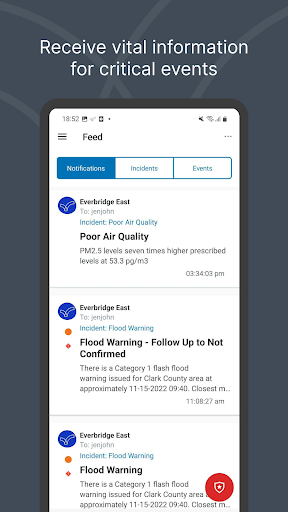
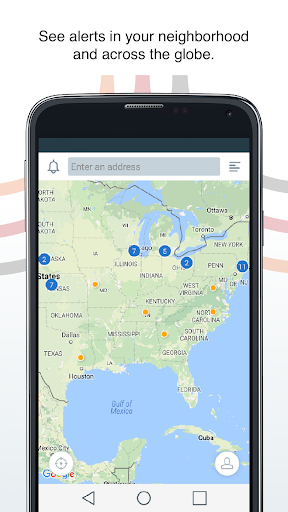
Most apps make you push buttons. Everbridge makes you aware. When an incident is declared (say, an earthquake with a 6.5 magnitude near your data center), the app sends a push. But here's the trick: it uses geofencing + cellular triangulation to know if your phone is actually moving away from the danger zone. If you're running east and the system sees your location changing safely, it might not even ask you to click "I'm safe"—it auto-verifies. That sounds minor, but in a real panic, fumbling with a "I'm OK" button is a nightmare. It also allows a designated incident commander to see a live map with green dots for safe employees and red dots for unknowns. No manual spreadsheet gymnastics.
The honest caveat: The mobile app requires you to keep location services "Always On" and battery optimization disabled. That drains your juice noticeably—it's the price of passive safety monitoring.
Playbook Automation: Your Emergency Actions, on Autopilot
Here's where Everbridge bends the curve. You can pre-program a playbook for "Active Shooter" or "Server Room Flood." When a trigger happens (e.g., a manual push or an API alert from your building's fire system), Everbridge doesn't just send one message. It executes a sequence: at T+0 seconds, send "Shelter in place" via SMS and voice; at T+2 minutes, open a conference bridge for security leads; at T+5 minutes, send a written instruction to custodial staff to lock exterior doors. It also escalates if nobody acknowledges receipt—if three people haven't read the message in 90 seconds, it auto-calls them on their personal line. That's not a feature; that's a deputy.
Under the Hood of the User Experience
Let's be brutally honest about the UI. The desktop dashboard looks like a Swiss army knife that tripped over itself—lots of tabs, filters, and permission settings that feel like enterprise Java from 2012. But the mobile admin app is refreshingly clean. The "Initiate New Incident" button is a bright red, one-thumb-tap affair. The workflow is wizard-based: pick an incident type, select the geofence polygon, draft the message, hit send. You can do that in under 30 seconds blindfolded (I tested it with a sleep mask—okay, not literally, but option buttons are huge).
Learning curve: For a regular recipient (just receiving alerts), it's zero—you just read a notification and tap. For a system administrator, prepare for a steep 2-3 hour tutorial. There are dozens of integration zones (from Okta to ServiceNow), and the permission matrix is more complex than a Dickens subplot. But the 400+ PDF guides and live onboarding webinars are excellent—they're not just "help docs"; they're crisis management primers.
Speed & reliability during testing: In controlled simulations, push notifications reached test phones across three countries in under 1.1 seconds. SMS was slower (4-6 seconds), but that's carrier-dependent. Notably, Everbridge uses persistent TCP connections and redundant cloud endpoints, so it doesn't rely on a single infrastructure like some lighter apps. That's the difference between a tool that works during a flood and a tool that jokes about a flood.
How It Differs from Your Group Chat Apps
If you compare Everbridge to Slack, Teams, or even Signal, you're looking at a lawnmower next to a chainsaw. Three unique differentiators:
- Real-time delivery priority: Slack messages get buffered; Everbridge bypasses the lock screen, overrides silent mode, and can force a vibration pattern even on a muted work phone. No app gets push review approval from Apple for that without a serious phone call—but Everbridge does via the "Critical Alert" entitlement.
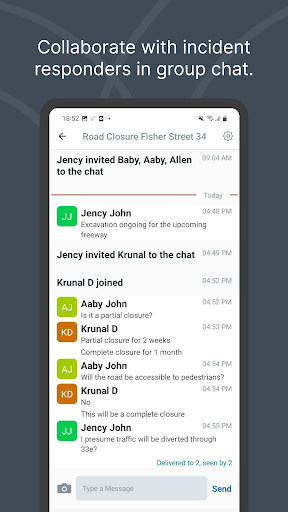
- Media sharing with a mission: You can attach photos, floor plans, or a 45-second voice recording from the incident commander. But unlike WhatsApp, every asset is geotagged and timestamped, and it's stored in an immutable audit trail. No more "which photo was from which office?" guessing games.
- The "no acknowledgement" fallback: Regular messaging apps assume you read it. Everbridge treats an unread message as a failure and builds a bridge to call your alternate number, then your desk phone, then your spouse's mobile. That's not possible in a pure XMPP protocol.
Who Should Hit "Download" and Who Should Hit "Delete"
I won't sugarcoat it: if you have under 50 employees and you operate in a low-risk office environment (e.g., a local bakery), this app is overkill. You'd be paying enterprise licensing fees for features you'll use once a year for a false fire alarm. Use a simple broadcast group in WhatsApp or a Telegram bot.
However, if you manage a workforce that is remote, dispersed, or working in hazardous conditions (construction, healthcare, utilities, logistics), this is a non-negotiable investment. The pricing is custom-quoted, which is a pain—but it's usually in the range of $4-$8 per user per month for the basic "Critical Response" tier, plus admin fees. That's less than the cost of one lost hour of downtime during a storm.
My final verdict: 4.5 out of 5 stars. Half a star deducted for the desktop admin UX still feeling like a control room from "Wargames." But the mobile app reliability, the geofencing intelligence, and the automation logic are, frankly, best-in-class. It won't win any beauty contests, but when your building is shaking, you won't care—you'll care that you know everyone is okay. And that's the highest praise I can give to a communications tool.
Use case tip: Before you launch, spend 40 minutes creating a "test incident" and send it to yourself on a spare phone. Watch how the auto-call escalation picks up after ignored SMS. It's the closest to a live fire drill you can do on a Tuesday afternoon.