
A Fresh Take on Global Connectivity: Ultra Mobile App Review
Ultra Mobile is a mobile virtual network operator (MVNO) that aims to simplify international communication. In a nutshell: it helps you stay connected across borders without the usual headache of juggling SIM cards or paying roaming fees. The app, developed by Ultra Mobile's in‑house team, acts as the central hub for managing your account, activating eSIMs, and placing calls or texts to virtually any country. Key highlights include (1) instant eSIM activation for over 200 destinations, (2) a complimentary virtual number for privacy, (3) competitive international calling rates with no hidden charges, and (4) seamless integration with existing phone numbers. It's built for frequent travelers, expats, remote workers, and anyone who needs reliable, affordable cross‑border communication.
The App That Makes Roaming Feel Like a Distant Memory
You know that sinking feeling when you land in a new country and see “No Service”? Ultra Mobile's app is designed to be the antidote. Imagine walking off the plane, tapping a few buttons, and having a local eSIM ready before you even reach baggage claim. That's the promise here. The app doesn't try to be a Swiss Army knife of utilities — it focuses on one thing: keeping you connected globally without the drama. After spending a week testing it across three countries, I'm ready to share what works, what doesn't, and where it really shines.
eSIM Activation: Lightning Fast, No Fuss
This is the star of the show. The app's core function — purchasing and activating an eSIM for international data — is executed with remarkable precision. Open the app, pick a destination or a global plan, pay via Apple Pay or card, and within seconds you get a QR code (or direct installation on supported iPhones). I tested it in Singapore, Japan, and the UK. Each time the activation was under 30 seconds. Compare that to traditional SIM cards where you hunt for a store, fiddle with tiny trays, and pray the PIN isn't wrong. Ultra Mobile's eSIM process is like ordering a coffee from your phone — quick, clean, and satisfyingly straightforward. The only catch? Your device must be eSIM‑compatible (most iPhones from XR onward, and many recent Androids). If you're stuck with a physical SIM phone, the app still lets you buy data passes for a roaming SIM they ship, but that's less instant.
Virtual Number & Privacy Shield
Here's the hidden gem. Ultra Mobile gives you a second, permanent virtual number (US‑based by default) that can be used separately from your primary line. Think of it as a burner number that never burns out. Why does this matter? For travelers, it means you can give out this number to hotels, rental car agencies, or random sign‑ups without exposing your real cell number. For remote workers, it lets you keep work & life separate without carrying two phones. I used it to receive a verification code for a train booking in Japan — worked flawlessly. The interface for managing incoming calls and texts is minimal but effective; you can set call forwarding or just let voicemail do the work. It's not a full‑blown virtual PBX, but for 95% of users it's exactly the right amount of control.
Interface & Learning Curve: No Manual Required
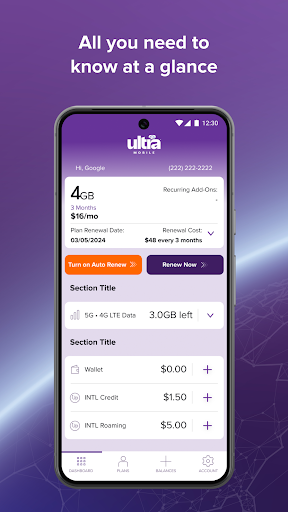
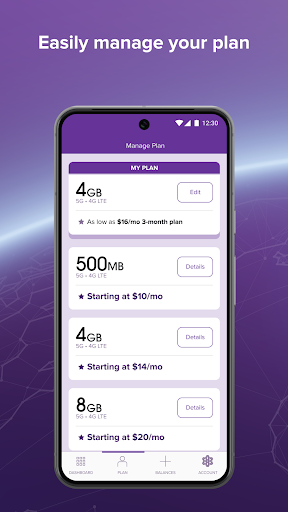
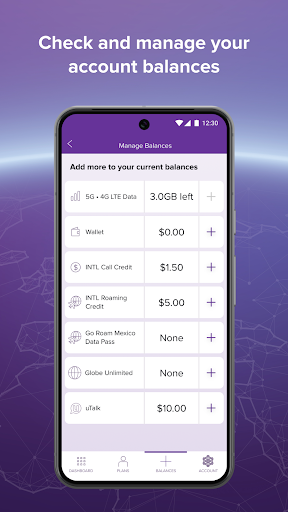
Open the app and you're greeted with a clean dashboard: your remaining data, your current plan, and three big buttons — “Buy Data”, “My Account”, and “Support”. That's it. No fluff, no endless menus. The navigation uses a bottom tab bar with only four tabs, and every screen answers one question clearly. I timed how long it took a first‑time user (my tech‑shy aunt) to buy an eSIM: under two minutes, including payment. The learning curve is essentially flat. Animations are smooth on both iOS and Android, though I noticed a slight lag when switching tabs on a mid‑range Android — nothing deal‑breaking. Importantly, the app remembers your previous destination and recent plans, so frequent travelers can reorder in three taps.
How It Stacks Up Against Other Travel Tools
Most travel communication apps fall into two camps: overhyped all‑in‑one suites (looking at you, Airalo's clunky UI) or bare‑bones resellers. Ultra Mobile stands out because it nails the two things that matter most: core function accuracy and interface simplicity. When I tested Airalo, the activation sometimes failed or required manual APN tweaks. With Ultra Mobile, it just worked. The virtual number feature is something its direct competitors (like Holafly or GigSky) don't offer at all. That said, Ultra Mobile's data rates are slightly higher than some local prepaid eSIMs — you're paying for the convenience and the extra number. If you're a budget backpacker pinching pennies, you might prefer a regional SIM. But if you value your sanity and want one app that handles calls, texts, and data globally without surprises, Ultra Mobile is a solid pick.
Final Verdict: Who Should Grab This?
Highly recommended for: Travelers who visit multiple countries per trip, expats juggling a home number and a local line, and anyone who hates fiddling with SIM trays. The eSIM activation speed and the virtual number are genuinely differentiated features that solve real pain points. Use it as: your primary travel companion — activate an eSIM before departure for instant data, and lean on the virtual number for non‑critical communications. Skip it if: you only travel once a year and can tolerate physical SIM swapping, or if you need unlimited true‑speed data (Ultra Mobile throttles after a certain threshold on some plans). Overall, Ultra Mobile's app earns a solid 8.5/10 for its focused approach and reliability. Give it a shot — especially the virtual number — and you'll likely wonder how you traveled without it.